
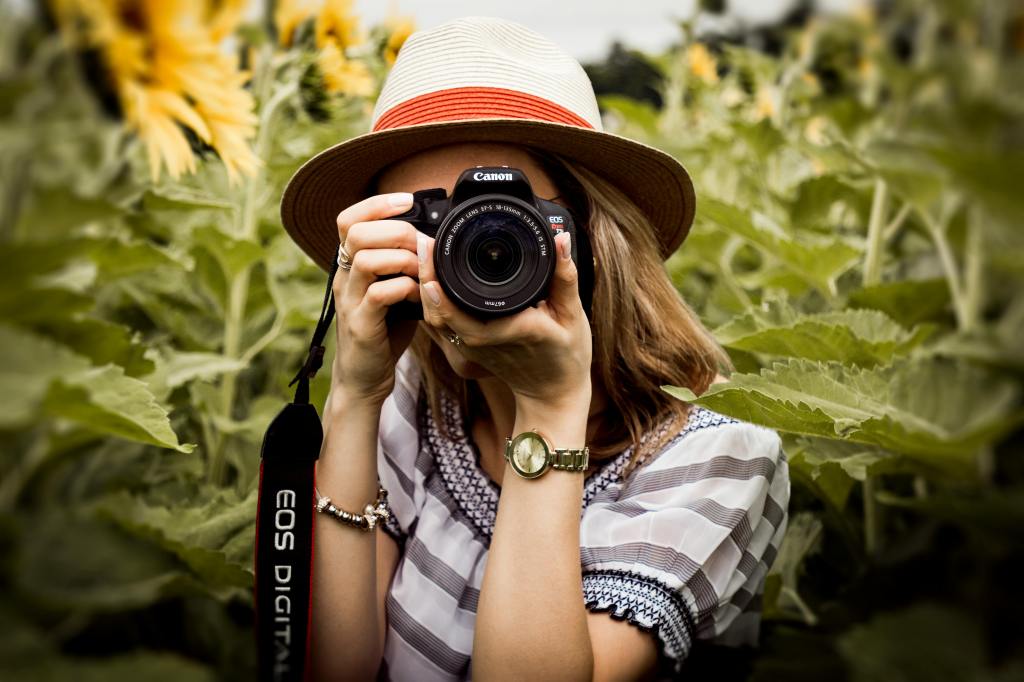
When I first started, I went out and bought a DJI Mavic Air 2 (drone), a GoPro Hero 7 (action camera), and a Canon EOS 90D (DSLR) with an 18-135mm f/3.5 lens. Two of those purchases I regretted almost instantly: the drone and the DSLR.
I quickly learned that I didn’t have the right ND filters to record with the drone in broad daylight. The GoPro sucked in the low-light situations and was way too high contrast in daylight. And finally, my Canon didn’t record less than 60fps at 1080p.
Not sure what all this means? That is precisely why any experienced YouTuber will tell you to START WITH A PHONE.
If you’ve read my newsletters about Filming 101, the Elements of Storytelling, and Emotion in Storytelling, you’ll know that I have not once touched on which camera to use or camera settings. Instead, I talk about understanding story structure, camera angles, composition, and much more. That’s because the camera you choose, and camera settings are the icing on the cake. But you have to make the cake first.
Additionally, if you are learning film from scratch as I did, you won’t have any idea what you want out of your camera gear in the first place! This is especially so if you have no idea what I was complaining about in the second paragraph.
Buying a camera as a beginner is an easy dopamine hit to make you feel like a YouTuber. Do the less sexy thing and learn how to use your phone first.
What I will cover
At this point though, I will assume you are ready to buy heaps of gear. For the rest of this newsletter, I will cover the following in the order below. Note this is a long, but comprehensive newsletter. Feel free to jump ahead.
- The basics to understand cameras
- How to choose a phone
- DSLRs & Mirrorless cameras
- Lenses
- GoPros
- Drones
- Tripods
- Clamps
- Gimbals
- SD Cards
- External Hard Drives
- Ring lights
- Power
- Backpacks
- Audio
- Take care of your gear!
- Camera needs checklist
I make a small affiliate commission off of all linked products at no additional cost to you. Thank you so much for your support!
THE BASICS:
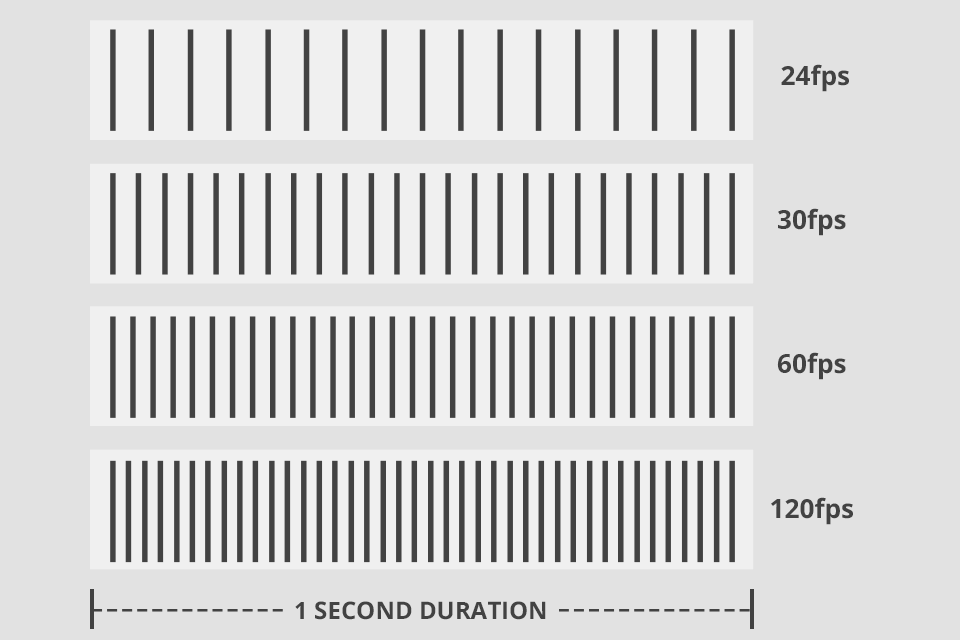
Frames Per Second (FPS): Frames per second means how many frames are squeezed into one second of video. Here are some basic rules of thumb with regards to FPS:
- 24-30 fps when talking to camera
- 60-120fps when recording b-roll
- 120-240fps when underwater filming fish or other fast-moving objects that you want to slow down.
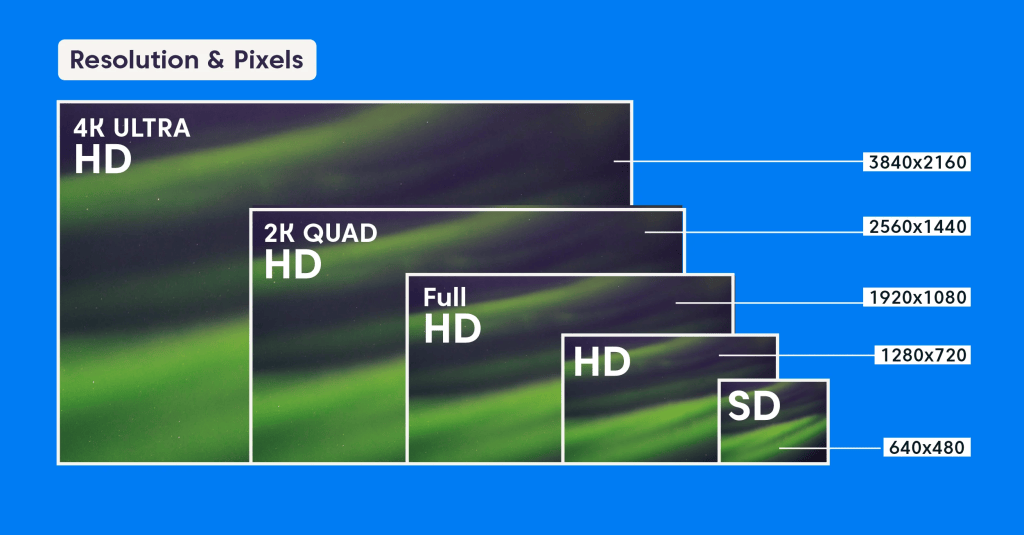
RESOLUTION: Video resolution is the number of pixels contained in each frame. There is some debate as to whether you should film in 1080p or 4000p, or any of the options in between. One big benefit of filming in 4000p (4k) is that it allows you to zoom in or add a slight pan without loss of quality. However, for most of us, unless you can afford a super fancy computer and have unlimited power supply, anything above 1080p will slow down most laptops and the added benefits aren’t worth it.
When choosing to render or film in 1080p, it will look like this “1920×1080” or “Full HD”.
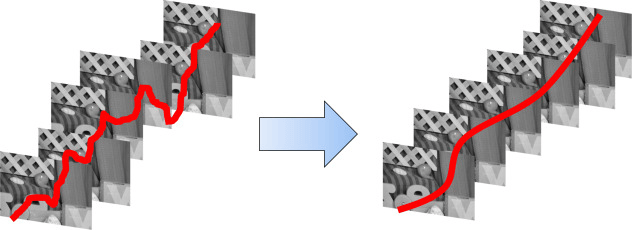
Stabilisation: Stabilisation makes your footage look smoother and less bumpy. Optical Image Stabilization, or OIS, is when physical parts of your camera lens move independently of your camera in order to counteract small amounts of motion, whereas Electronic image Stabilization does this through software: zooming the footage in and aligning individual frames together. You can also stablilise in your editing software.
Note that I have had viewers complain that the images seem too robotic when I use the Electronic image Stabilization options in my camera or editing software. It also makes the images lower quality.
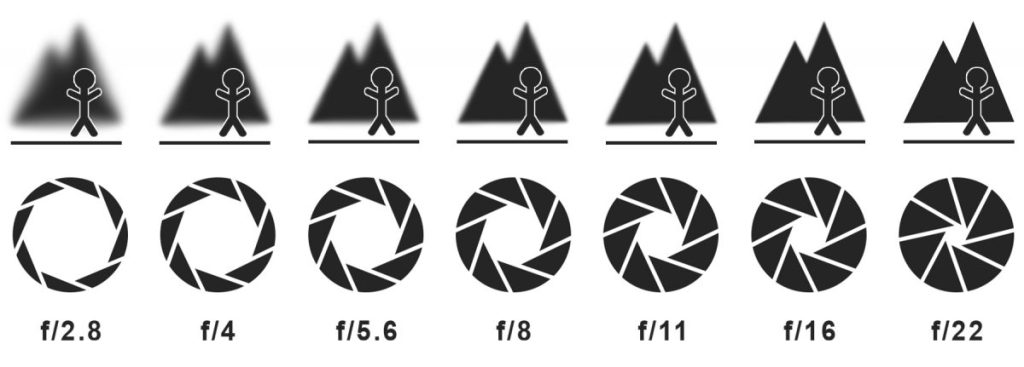
Aperture: Aperture affects light sensitivity (a larger opening collects more light, resulting in better low-light performance) and depth of field (the blurriness you often see in the background of photos).
The narrower a camera’s aperture, the sharper all parts of a photo appear. Counterintuitively, the smaller the number, the larger the aperture’s opening and the blurrier some parts appear. That blur in the background is one of the easiest ways to make your filming look professional.
Aperture is noted as a number following an “f”.
CHOOSING A PHONE:
Megapixels #: Generally, but not always, the more pixels you have, the more you can crop a photo before seeing the actual pixels of your image. I say not always, because ultimately, the quality of processing software as well as sensor size play a huge role.
Be sure to pay attention to the megapixel number for all cameras though, because, as a vlogger, you will use both your front and back camera equally. You’ll see pixel size noted as mp.
Megapixel Size: You also want to check the megapixel size. Bigger pixels = more surface area to let light through = better dark imagery. However, this is not always true as, again, software plays a major role.
You’ll see pixel size noted in μm — a symbol that stands for micrometers. The Google Pixel 7’s 50-megapixel primary camera sensor, for example, has a pixel size of 1.2 μm.
Sensor Size: In mobile photography, sensor size matters for the same reason pixel size matters. A larger sensor has a larger surface area that collects more light, improving performance in dim settings. Bigger sensors can also accommodate more individual pixels without sacrificing light sensitivity.
Sensor sizes are often noted as two numbers. For example, the OnePlus 11’s primary camera has a 1/1.56-inch sensor.
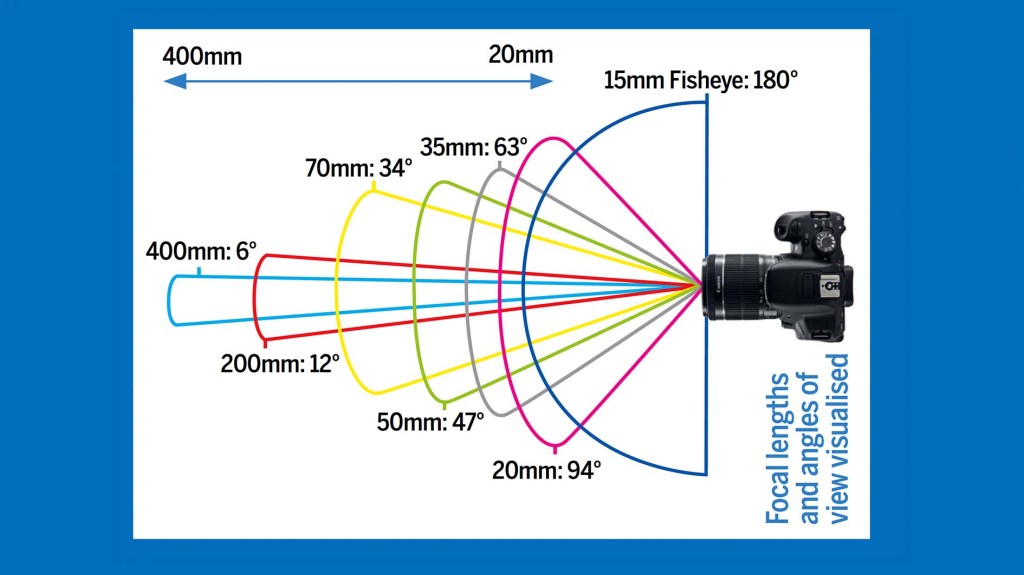
Field of View: In mobile photography, the field of view is most often mentioned in the context of ultra-wide secondary cameras. If you made a triangle by drawing a line between two opposing corners of the camera’s field of view, between each of those corners and the camera sensor, the angle of the corner at the sensor would be 120°.
Personally, my wide-angle lens on my iPhone is a godsend! I use it all the time, and recommend making sure you have this on your own phone.
PHONE EXAMPLES:
Below are some examples of the specs on the top phones from 2023 when I was just buying a new phone. In the end, I went with the iPhone 14 Pro, as it had by far the best battery life for the offered specs.
iPhone 14 Pro Max: 48 MP, 24mm (f/1.8), 12 MP, 77mm (f/2.8), 12 MP, 13mm, (f/2.2) Front video: 4K/60fps, Rear video: 4K/60fps
Google Pixel 7 Pro: 50 MP, 25mm (f/1.9), 48 MP, 120mm (f/3.5), 12 MP, 126˚ (f/2.2), Front video: 4K/60fps, Rear video: 4K/60fps
Samsung Galaxy S23 Ultra: 200MP, 23mm (f/1.8),10MP, 230mm Periscope (f/4.9), 10MP 70mm (f/2.4), 12MP 13mm 120° ultra-wide (f/2.2), Front video: 4K/30p, Rear video: 8K/24p
Music & sound effects for creators. No copyright issues.
$6.99/month
✅ Unlimited downloads
✅ 100% catalog access
✅ Safelist up to 3 YouTube channels
✅ For individual creators & micro organizations
✅ Premium tracks & sound effects

BIG CAMERAS:
Talking about the best vlogging camera out there would be an article in itself and well above my paygrade, but here are some things to consider when buying a DSLR or Mirrorless camera for travel vlogging:
- Easy-to-reach controls: a large easily accessible record button is helpful, and some cameras are compatible with a grip that has a few controls.
- Vari-angle screen: To see yourself when talking to camera, a vari-angle screen, or one that can be flipped 180° so it’s visible from in front of the camera, is ideal.
- Stabilisation: If you’re going to handhold the camera it’s helpful if the internal software or the lens has stabilisation built-in to take out some of the shake and wobble.
- External mic port: For the best audio quality, you’ll need an external mic. Aim for a camera that has a mic port (usually a 3.5mm connection) so you can record the audio directly onto the camera rather than syncing it later.
- Face / eye detection: Most cameras have eye or face detection these days, which is super important when vlogging. Make sure you have a camera that can keep focused on you when you’re talking to the camera.
- Battery life: How long is the battery life? You will likely need to purchase more than one battery.
- Mirrorless or DSLR: Mirrorless cameras tend to be lighter and more compact and also produce better 4k for the size. Weight matters when you’re holding the camera with one hand while talking to the camera! My DSLR Canon EOS 90D is a PAIN for exactly that reason!
CHOOSING A LENS:
Most lenses today are named in a relatively standard way:
- Brand name, lens type, focal length (in mm), maximum aperture, other lens features/abbreviations.
For example:
- “Nikon AF-S 24-70mm f/2.8 E ED VR” lens.
- “Canon EF 24-70mm f/2.8 L II USM” lens.
Arguably, the most important things to note are the focal length and maximum aperture, bolded above (unless you are purchasing special lenses). Most beginner cameras come with an 18-55mm f/3.5 “kit lens”. This lens allows you to apply a slight background blur (done with a low aperture) and zoom in to objects (done with the focal length) that aren’t too far away.
Rather than pretending I know heaps about lenses, let me tell you my personal experience. I love that my upgraded 18-135 f/3.5 lens allows me to zoom in a bit more beyond the kit lens. However, at the time I bought my lens, I didn’t realise that the EF-S on my lens meant that when I zoom in from 18mm to 135mm, my maximum aperture is f/5.6. In essence, this means my ability to have a blurred background and let in light decreases as I zoom in. Therefore, I wish I had saved the money and purchased a lens with a lower f-stop maximum.
Now, worried that I am creeping into a space where one of you with camera expertise will send me a correction email (actually do, please – I love to learn), my recommendation is to go to a camera specialist, tell them what types of videos you most often take, and ask for their expert opinion. One side note though: lenses are heavy and costly, so keep that in mind as you plan to tramp around the world.
GOPRO:
The GoPro is hands down one of the most common cameras for adventurers. When considering a GoPro, here are some things to think about:
Up to 2018 models ONLY: These cameras are waterproof to 33ft (10m) with the door closed. If you dive deeper, you need to use the Protective Housing.
Benefits:
- Under water
- Killer stabilisation
- Unobtrusive
Extras to consider:
- Protective Housing
- External Microphone
- Floating Handle
- Straps for chest, head, or mouth
DRONES:
Consider the following:
- Obstacle detection and avoidance system is a drone sensor that identifies the upcoming hurdle and avoids it. It is a feature that may cost you some extra money, but it is worth it.
- A good GPS system improves the general stability and navigational skills of the drone. Check to see if the drone has a return to home (RTH) technology, as this will make your life easier.
- One of the most important factors of purchasing a drone is its battery life. Most modern-day drones give almost 30-35 minutes of recording and flying time.
- Most drones come with built-in cameras, while others allow you to attach your camera. Pay attention to the resolution (1080p minimum) and fps options (60fps minimum).
- More expensive and professional drones have a large range to cover more area in your shots. The range is quite important if you’re a vlogger who likes to do a lot of aerial photography.
Note the following if you decide to buy a drone:
- Permit is compulsory for commercial drone flying in the USA. You need local permission in each country.
- It is forbidden to fly a drone while controlling it from within a moving vehicle in most countries.
- Drones can be invasive, violate privacy, and make locals uncomfortable.
- You cannot fly your drone at a height of more than 400 feet or more than 100 mph.
- You cannot fly over government buildings, military or police establishments, or any other places which are covered under the no-fly zone.
Note that there are numerous 360 camera options these days that produce similar footage to a drone. If you choose this alternative option, the longer the pole, the more it appears to be a drone shot. That said, you do need image stabilisation for this.
EXTRAS:
Below is a list of extras you may want to consider.
Tripods:
A tripod is a portable three-legged frame or stand, used as a platform for supporting the weight and maintaining the stability of your camera. When buying a tripod, make sure you consider the following, especially for big cameras:
- Not great on boats since they can fall over, but fantastic on land.
- Weight rating: Always make sure that the tripod you want to buy can support at least 1.5 times more than the total weight of your camera and your heaviest lens.
- Tripod height: A tripod should at least match your height so that you do not have to bend to look into the viewfinder.
- Foldable / compact: Centerpost is less stable. More sections are less stable.
- Tripod weight and construction: Keep the tripod legs without the head under 5 pounds.
- Tripod head angles & quick release.
If you are using a phone tripod, I suggest getting something that is a part of your phone case for easy set up. This design by Peak Mobile is a sturdy option.
Clamps:
A clamp is used for attaching cameras to a variety of surfaces including walls, tables and bars. When buying a clamp, make sure you consider the following, especially for big cameras:
- Grip strength
- Grip pad material
- Weight rating
- Versatile for various applications
- Suitable for various devices
- Easy to tighten
Gimbals:
A gimbal is a device designed to hold a camera in a manner that prevents or compensates for unwanted camera movement, such as “camera shake”.
I do not recommend buying a gimbal for a big camera, especially if you are living in a small adventure machine. They are a pain to “rebalance” every time you use, they are bulky, and don’t work well when the motors start getting tired. However, if you do decide to buy a gimbal, make sure you consider the following in relation to the device you will use with it:
- Overall weight & size (How much will you have to carry around with you?)
- Payload capacity (How much weight can it hold and still work?)
- Battery life
- Three-axis stabilization (Does it balance in all conditions?)
- Storage (Do you have to rebalance every time?)
SD Cards:
SD cards are removable storage devices, which are used in digital cameras to record the photos and videos you capture.
When you buy a new SD card, you should format it before use and then regularly after that. Formatting deletes everything on the card. Always format memory cards in the camera that you’ll be using them in. That sets the card up with the filesystem, folder hierarchy, and, in some cameras, a database file, so that the card is just how the camera expects. That greatly reduces the risk of unexpected errors and unpleasant surprises.
Consider the following when buying an SD card:
- There are different file systems on SD cards. The SD and SDHC systems are considered outdated and not worth considering.
- Get 64GB minimum, though I would urge you to go bigger if you plan to not have access to a computer for a long period of time.
- Class 2, 4, and 6 minimum write speeds are too slow for the size of most images and video files.
- Aim for 100 MB/s (megabytes per second) or faster. 1 megabyte (1MB/s) is roughly equal to 8 megabits (8Mb/s). Note that you only need a fast SD card if your camera supports it.
- Sandisk, Lexar, PNY, Kingston, and Transcend are all quality makers.
External Hard drives (SSD vs HHD):
An external hard drive is a device that you plug into a computer port that gives you more storage space to keep your data. You will need this eventually, though note that for most of us, your editing software will run faster when the files are directly on your computer. When buying an external hard drive, consider the following:
- Storage capacity (1 TB minimum)
- Performance
- Connectivity (if editing from drive rather than from your computer)
- Durability and Portability
Ring lights:
A ring flash is a circular light that is often operated with a camera lens in the center to take photographs. Unlike point light sources, a ring flash can illuminate a subject with minimal shadows. I highly recommend a ring light if you do a lot of talking heads, live chats with your audience or if you record interviews. When buying a ring light, consider the following:
- Size
- Dimmability
- Range of color temperatures
- Plug in or battery powered
Power:
With so much gear, it is crucial you are able to keep everything charged. When you’re on the move in your adventurous lifestyle, its important you consider all your power needs. Consider the following:
- Which devices will I regularly use?
- How many spare batteries do I have?
- Will I be filming in any situations that will drain the batter faster? (high frame rate, high resolution, etc)
- Will my gear be stored in hot or cold conditions? Batteries discharge fastest in hot conditions.
- Are there often rainy or cloudy conditions where I charge my devices?
Once you understand your power needs, consider which options would meet your needs:
- Solar (If it’s often cloudy where you are, this might not work)
- Generator (Will you have access to fuel?)
- Battery packs (Are you in hot conditions that will drain your batteries?)
Backpacks:
When you start getting more gear, it’s a good idea to get a backpack that is specially made for folding it all. A special backpack will allow you to carry more gear efficiently as well as protect your gear. When buying a backpack, consider the following:
- What gear will I carry?
- Waterproof
- Comfort (chest strap)
- Protective internal dividers
- Extra features (water, computer)
- Quick access
- Tough exterior
- Flight considerations
- Build quality and weight
Audio Gear:
I’ve touched on audio gear in a previous newsletter that you can read here.
TAKE CARE OF YOUR GEAR!
Gear is expensive and will quickly deteriorate in the harsh conditions many of us put ourselves in. Take care of your gear by wiping off all dirt. Rinse anything that has been in saltwater in freshwater. Consider even soaking protective gear in fresh water. Store gear in a protected area where it won’t get banged.
ACTION:
All in all, I can’t recommend starting with your phone enough. But once you have evolved past your phone, be thoughtful about your needs. Go through and answer these questions to get clarity:
- Will I be in water?
- Will I be filming distant wildlife?
- Will I have good light?
- Will I film at night?
- Will there be lots of movement?
- Will I be able to hold the camera with both hands?
- Do I need to pick up good audio?
- Will I need lots of different shot types?
- Will I be carrying my gear long distances?
- Will I have a safe space to store my gear?
- Will I be able to charge my gear often?
- Do I want slow cinematic shots?
- What is my audience primarily on my channel for? (if the area/location, then I might need drone).

